Note: In June, the personal technology column I’d written for more than 30 years at the Chronicle ended. After spending the summer enjoying being a bum, studying the art of retirement and mostly watching paint dry, I’ve decided to write occasionally here when the mood strikes, or when I come across some gear I think you’ll want to know about. That’s what this is: CarpodGo approached me about reviewing their latest CarPlay display, and as you will see, I had a personal reason for checking it out. Expect to see more of this in the coming months. -D.S.
Almost a decade ago, my lovely wife bought a new car: A 2017 Prius 4. I’d gotten a look at this redesigned version of Toyota’s original hybrid the year before, when I reviewed the 2016 version for my blog. My wife had a 2012 Prius and loved it, and shortly after my review she gave that vehicle to our oldest.
While the 2017 Prius was a comfortable car with killer gas mileage – I had been able to get 85 mpg under the best conditions – it lacked one important feature. Toyota had not yet adopted Apple’s CarPlay, which mirrors an iPhone user’s phone screen in a vehicle’s infotainment system. I enjoyed driving her car until, two years later, I bought a 2019 Toyota C-HR, which did have CarPlay. Suddenly, I was spoiled, and I would always prefer to drive my car, despite the Prius’ more economical oeuvre. I became a CarPlay snob.
And it’s not just me. iPhone users who own vehicles with CarPlay usually become die-hards. Just ask GM, who suffered the slings and arrows of internet scorn when the company announced it would support neither CarPlay nor Android Auto in its latest electric vehicles – and then doubled down by saying that it would eventually drop the features in its gasoline-powered fleet as well.
GM’s stance pretty much guaranteed I’d never buy a GM EV; many other CarPlay fans feel the same way. (It’s worth noting that while Android Auto is also digitalia non grata on GM cars and trucks, Google is supplying a custom version of Android as part of its software package.)
The point to be made is this: Once you’ve had a phone-mirroring technology like CarPlay or Android Auto on your dash, it’s very hard to go back. But if you have an older car or truck that doesn’t support CarPlay, you’ve got two options: Either replace the head unit for the stereo/infotainment system with one that allows for phone mirroring, or add a standalone display dedicated to mirroring an iPhone or Android device.
The joy of the display
The latter category is simpler and less expensive, and there are literally dozens of models available on Amazon. However, their quality varies, and many suffer from the same problems as the cheap adapters that provide wireless CarPlay/Android Auto capabilities to vehicles that only have the wired variant. The issues include connection drops and sluggish performance. In addition, the cheaper standalone displays are sometimes slow and not bright enough in direct sunlight.
So, when vehicle-screen maker CarpodGo offered a review unit of its latest high-end CarPlay screen, I was intrigued. I’d long thought about trying a standalone display for CarPlay in my wife’s Prius, and here was an opportunity to see what she’d think. Even though I was trying really, really hard to be retired, I told the Chinese-based company to bring it on.
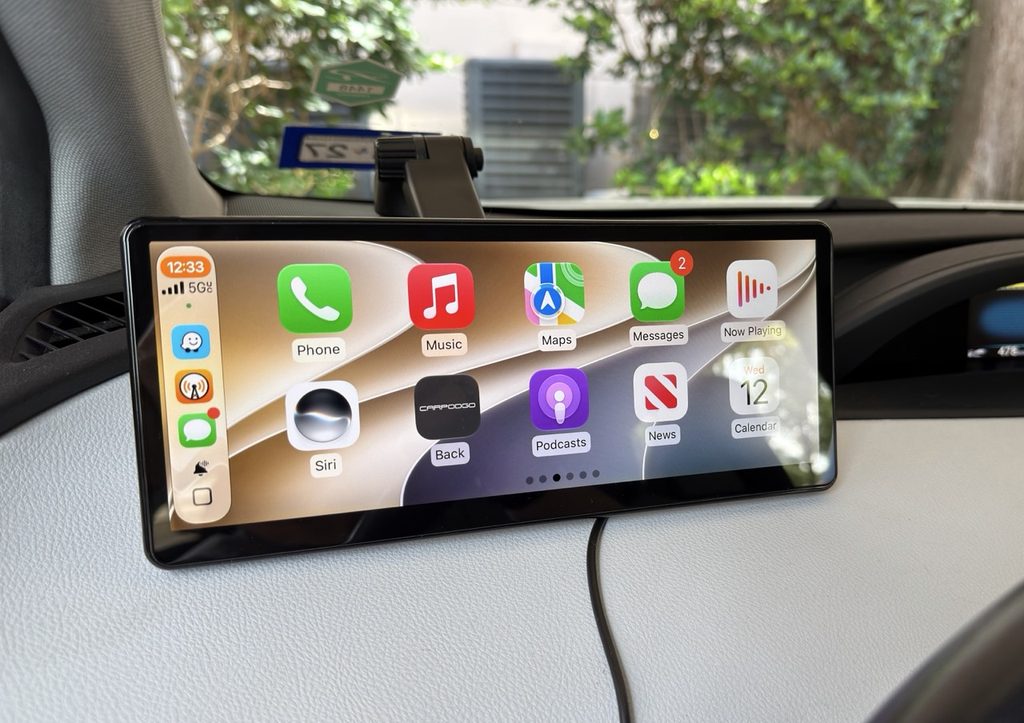
CarpodGo shipped me the T4 Plus, its flagship device that just became available on Amazon, where it currently sells for a list price of $250. The T4 Plus is a beast, with an expansive 10.9-inch diagonal IPS display that boasts a brightness rating of a whopping 1,000 nits and a refresh rate of 60 Hz. It includes several different dashboard mounts, a custom DC-port plug to power the screen and an actual physical manual – a rarity these days, when online documentation is more often the standard – though it’s printed in the tiniest font imaginable. A magnetic base connects to the various mounts that lets you quickly remove the display if you don’t want to leave it in your car when when away.
A smaller version, the T4, is functionally identical but with an 8.9-inch diagonal display. It lists for $230.
CarpodGo also sells an optional rear-view camera for older vehicles that lack one, which is now required as a safety feature. It works with both sizes.
My original approach was to set this up in the 2017 Prius and let my wife use it for a while as part of the review. But just before the T4 Plus arrived, our kid’s hand-me-down 2012 Prius incurred yet another major repair. As reliable a vehicle as it’s been, after 14 years its time had come – it was costing us more than it was worth. We made the call to give them the newer Prius, which meant I needed to drive the car nearly 800 miles from Houston to where they live in southwestern Illinois. My wife already had a plane ticket for a planned visit, so I was on my own on the road – just me and the T4 Plus for two full days of summer driving.
Set up and go
Getting the display ready to go was fairly easy. As is the case with wireless CarPlay adapters, CarpodGo’s screens connect to a phone first via Bluetooth, then hand off to a WiFi connection. Since the screens don’t come with speakers, you must also make sure you have a Bluetooth connection to your infotainment system – which, if you’ve been toodling around in a vehicle without CarPlay, you likely already have – for audio and phone calls.
Oh, and here’s a setup tip: You don’t actually have to be in the car to initially pair your phone to the screen. You can do it in the comfort of your home, with the screen connected via USB-C to any charger that supports the Power Delivery charging protocol and can provide at least 9 volts of power. Once paired, you can focus in the vehicle on getting the display mounted on the dash.
And getting it mounted is the bigger challenge. Both the T4 Plus, which weighs just over a pound with the magnetic base attached, and the smaller T4, require that the bottom of the screen be resting on the top of the dash. That’s because with any of the supplied mounts, the vehicle’s movement can cause the whole assembly to come loose while driving if the display is suspended. As a result, finding a location in the vehicle where the screen is in easy reach for touching but also adequately supported was tricky in the Prius. I wound up placing it to the left of the steering wheel.
Also keep in mind that, even though this is wireless CarPlay, it’s not really “wireless.” In fact, you’ll need two cables – one to feed power to the display, and another to keep your phone charged while using GPS and navigating. For that reason, I opted not to use the included power cable and plug that came with the T4 Plus, because while it has a USB outlet for a phone on the plug, it’s USB-A, which doesn’t provide enough muscle to keep my iPhone 17 Pro Max charged while Waze or Apple Maps keep track of where I am. Instead, I used a 120-watt adapter that plugs into the DC port with 2 USB-C connections.
On the road with the T4 Plus
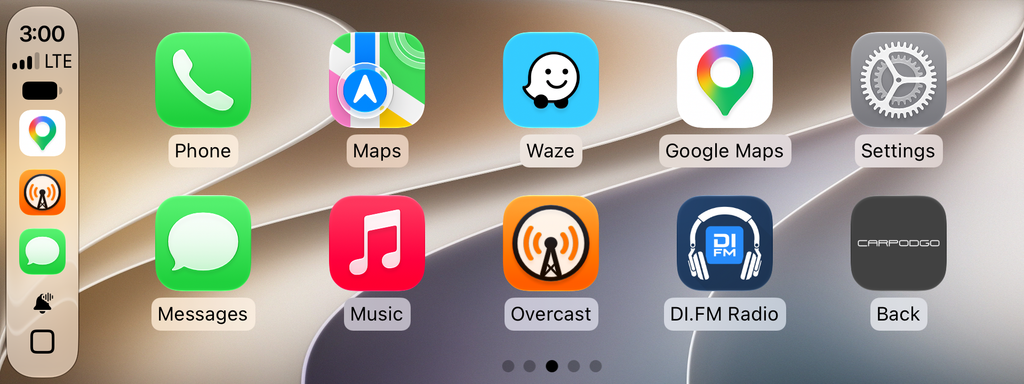
During the two-day drive, using the T4 Plus for CarPlay was a joy. Its wide display presents an additional column of app icons than found my C-HR’s smaller screen. It’s also much faster then my car’s built-in display – swiping between screens and opening apps was lightning-quick. And the super-bright screen was perfect for the sunny, cloudless conditions of a long summer road trip. (It auto-dims as needed.) The connection was rock-steady, and connected to my phone instantly whenever I started the car.
But those sunny conditions resulted in one of the few glitches in my testing. Temperatures all along the route were close to or sometimes over 100 degrees, and because the T4 Plus was atop the dashboard and thus was often in direct sunlight. The resultingheat would cause the display to slow down so that apps dragged while opening, and moving between home screens was sluggish. The fact that the back of the screen is black plastic didn’t help, and for much of the drive was hot to the touch. When it was not in direct sunlight, or after I’d stopped for a while and then got back on the road, performance returned to normal.
This is not uncommon among smart devices. Anyone with an iPhone who has it mounted in a vehicle so that direct sunlight hits it has experienced the “Charging on hold until iPhone returns to a normal temperature” message. In this case, the T4 Plus was usable, just a little annoying.
One other annoyance had nothing to do with the screen itself, but rather the Bluetooth connection in the Prius. Because the vehicle dates back to 2014, it uses an older version of Bluetooth, and the audio during phone calls was, um, sub-optimal, with low-quality sound that was sometimes difficult to hear. This was something my wife often complained about while she was driving the car, and on my trip I felt her pain. The T4 screens do have have the option to use a direct AUX jack connection or even an FM connection to the radio for audio. I didn’t try either.
One feature I wish the T4 Plus had: A dashcam. Given that the screen must sit atop the dashboard, it has a great view of the road ahead. I would have preferred that over the rear camera option, though adding a recording camera to the display could have made the heat issue worse.
One other missing feature: Over-the-air firmware updates. The T4 Plus and T4 require that you download new firmware to a flash drive, which is then inserted into a USB-C port on the back of the screen. This is cumbersome and could result in errors. A CarpodGo spokesperson said the company is working on adding OTA updates, but didn’t have a timeline for when.
Conclusions
The CarpodGo T4 Plus is an excellent standalone CarPlay display, and if you’re in the market for a way to bring CarPlay to an older vehicle, it’s worth your consideration. However, I have one caveat. In a smaller car like the Prius, or any vehicle with limited space to mount the display, I’d recommend the smaller, 8.9-inch model, which has the same brightness and speed.
Is your car’s cabin even more cramped? The company also makes the Mini, a 6.9-inch version with the same 60-Hz refresh and 1,000 nits of brightness. It lists for $120, and is easily the best value of the three. Another benefit: The Mini does not require that the bottom of the screen be resting on the dash. Bueno.